




.webp)























































Lưu ngay bộ prompt Gemini AI độc quyền tạo ảnh vibe công sở chuyên nghiệp đậm chất CEO/Creative kết hợp thần thái tập trung, tự tin
"Working Vibe"- Ảnh trong trạng thái làm việc là hình tượng kết hợp giữa sự chuyên nghiệp và sự tập trung trong không quán cafe hay góc ban công thoáng đãng. Giờ đây, thay vì phải chuẩn bị phức tạp, bạn dễ dàng sở hữu những bức ảnh đậm chất CEO/Creative với laptop, ly cà phê và phong thái tự tin, thanh lịch chỉ bằng vài câu lệnh trên Google Gemini.
Sắm Galaxy S25 Series chụp ảnh cực nét, sống động tại Minh Tuấn Mobile:

Samsung Galaxy S25 5G 12GB 256GB
Ngừng kinh doanh
Samsung Galaxy S25 Plus 5G 12GB 256GB
Ngừng kinh doanh
 -20%
-20% Samsung Galaxy S25 Ultra 5G 12GB 256GB - SM-S938BZTBXXV
Sắp về hàng
26,990,000đ33,380,000đ
Cách tạo ảnh working vibe cùng Gemini
Bước 1: Truy cập công cụ và tải ảnh lên
Đầu tiên, bạn tìm kiếm và truy cập vào trang web của Google Gemini hoặc ứng dụng Gemini trên điện thoại. Chọn tính năng "Tạo hình ảnh" (Image Generation) hoặc giao diện nhập câu lệnh trực tiếp.
Sau đó, bạn tải lên bức ảnh chân dung rõ nét mà muốn AI sử dụng khuôn mặt. Lưu ý chọn ảnh chính diện hoặc góc 3/4 rõ ràng, không bị che bởi tóc hay vật thể. Bên cạnh đó, ánh sáng cần đồng đều, không quá tối hoặc bị ngược sáng mạnh để AI lấy nét tốt nhất.
Bước 2: Nhập câu lệnh
Sao chép và dán (copy-paste) một trong các câu lệnh sau vào Gemini.
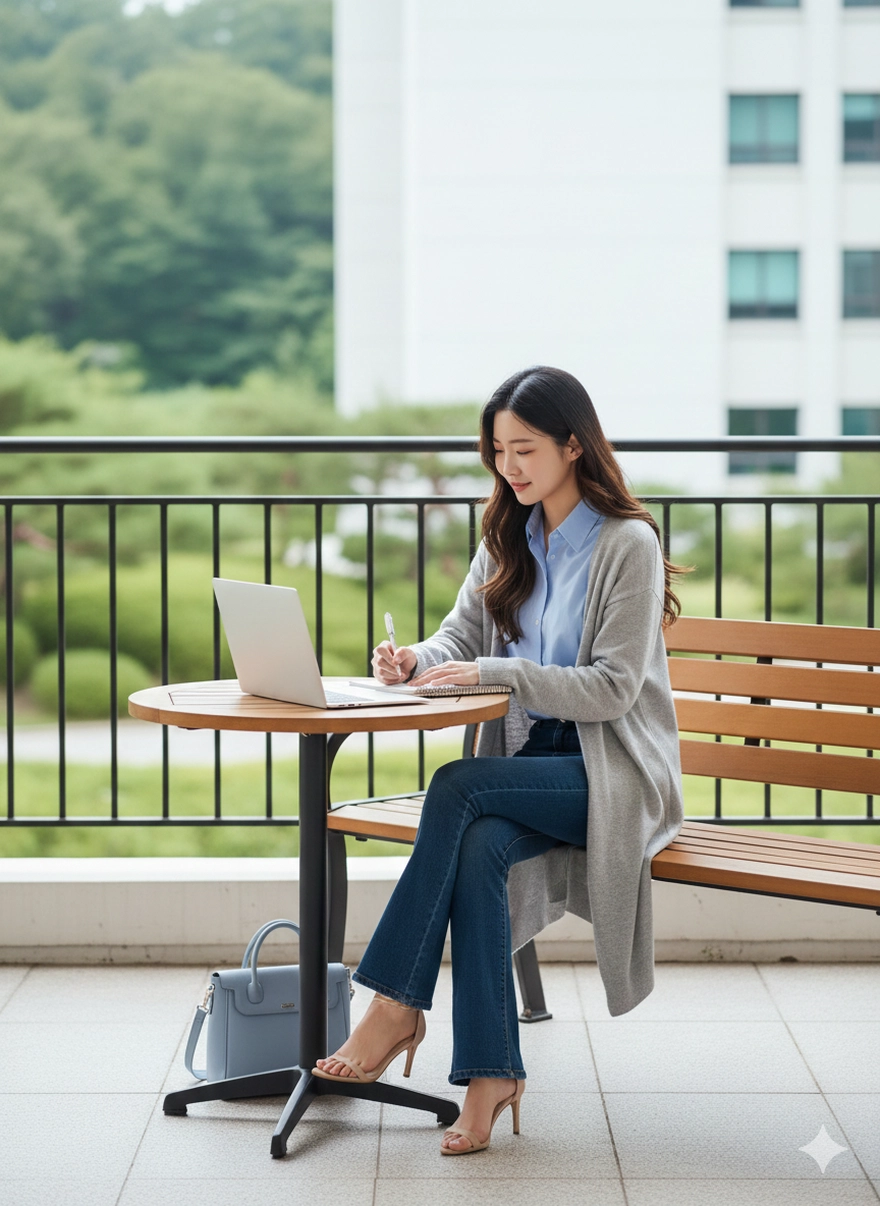
Ảnh 1: Keep the exact same face from the uploaded image.
Create a lifestyle outdoor studying/working scene.
Female character sitting on a bench at a campus balcony, writing in a notebook while a laptop is open on the table in front of her. Soft, focused expression.
Outfit: light blue shirt, long light-grey knit cardigan, dark blue flared jeans, nude high-heel sandals.
Props: pastel blue handbag beside her, small wooden table, metal balcony railing.
Setting: outdoor daytime with soft natural light, background of greenery and a white building slightly blurred.
Clean, bright Korean-style lifestyle aesthetic, high-resolution, natural tones.
Ảnh 2: Recreate the image from the uploaded photo while keeping the exact same face and all facial details. The girl is sitting in a café near a large glass window on a rainy day. Outfit: oversized white shirt, wide cream/white pants, hair in a soft low bun with loose strands. Pose: sitting sideways, one hand on a laptop, the other holding a small glass. Soft natural lighting, calm atmosphere, modern aesthetic, high clarity, gentle color tones

Ảnh 3: Recreate the image from the uploaded photo while keeping the exact same face and all facial features. The girl is seated in a warm-lit café/working space, working on a laptop. Outfit: simple black dress with an oversized blue shirt, hair tied in a low bun, wearing thin-frame glasses. Pose: sitting upright and typing on the laptop with a focused expression. Soft indoor lighting, calm and professional atmosphere, modern aesthetic, high clarity

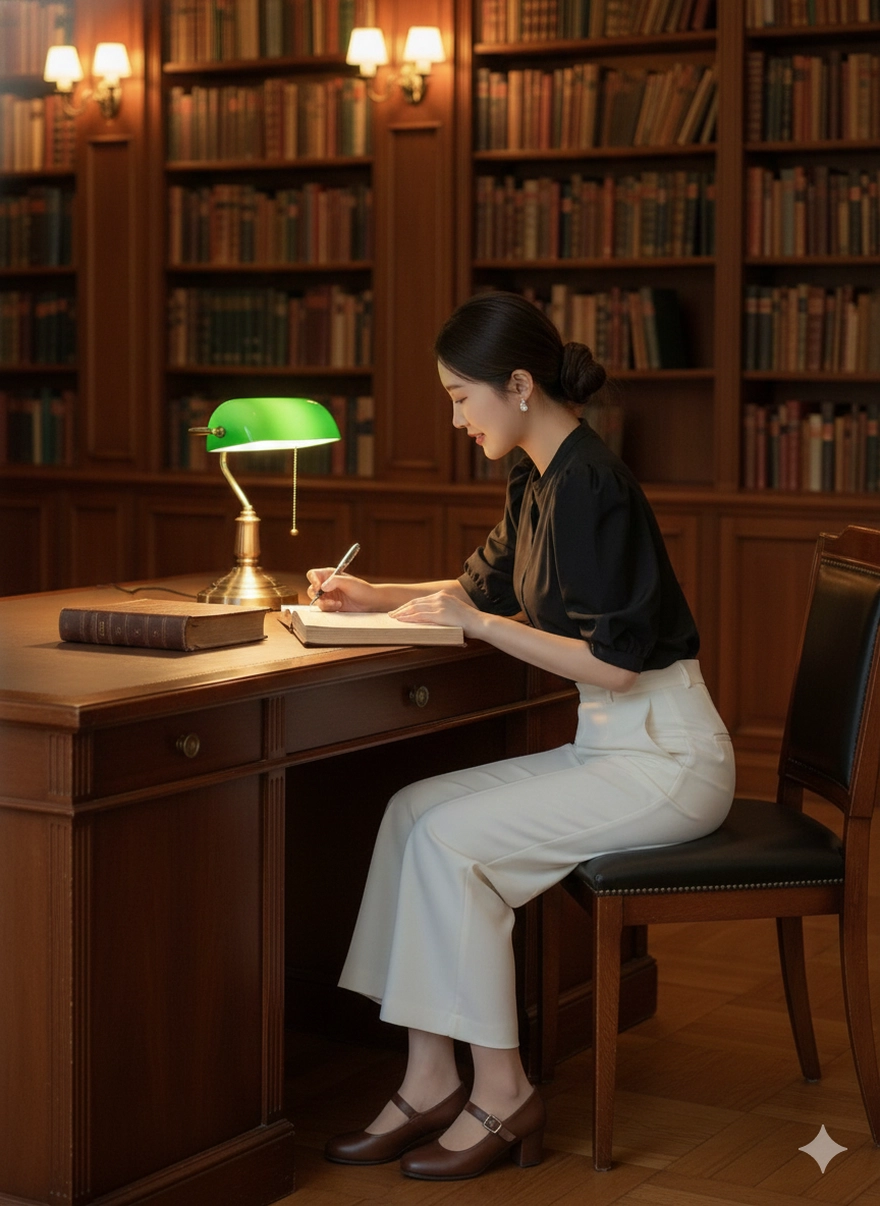
Ảnh 4: Recreate the image from the uploaded photo while keeping the exact same face and all facial features. The girl is sitting in a classic European-style library with warm yellow lighting, wooden interiors, and signature green desk lamps. She is leaning slightly while writing in a notebook, holding an open book in the other hand. Outfit: black puff-sleeve blouse, white wide-leg trousers, brown Mary Jane shoes, hair tied in a low bun. Side-angle shot, academic and vintage atmosphere. High clarity, warm tones, elegant modern-vintage aesthetic
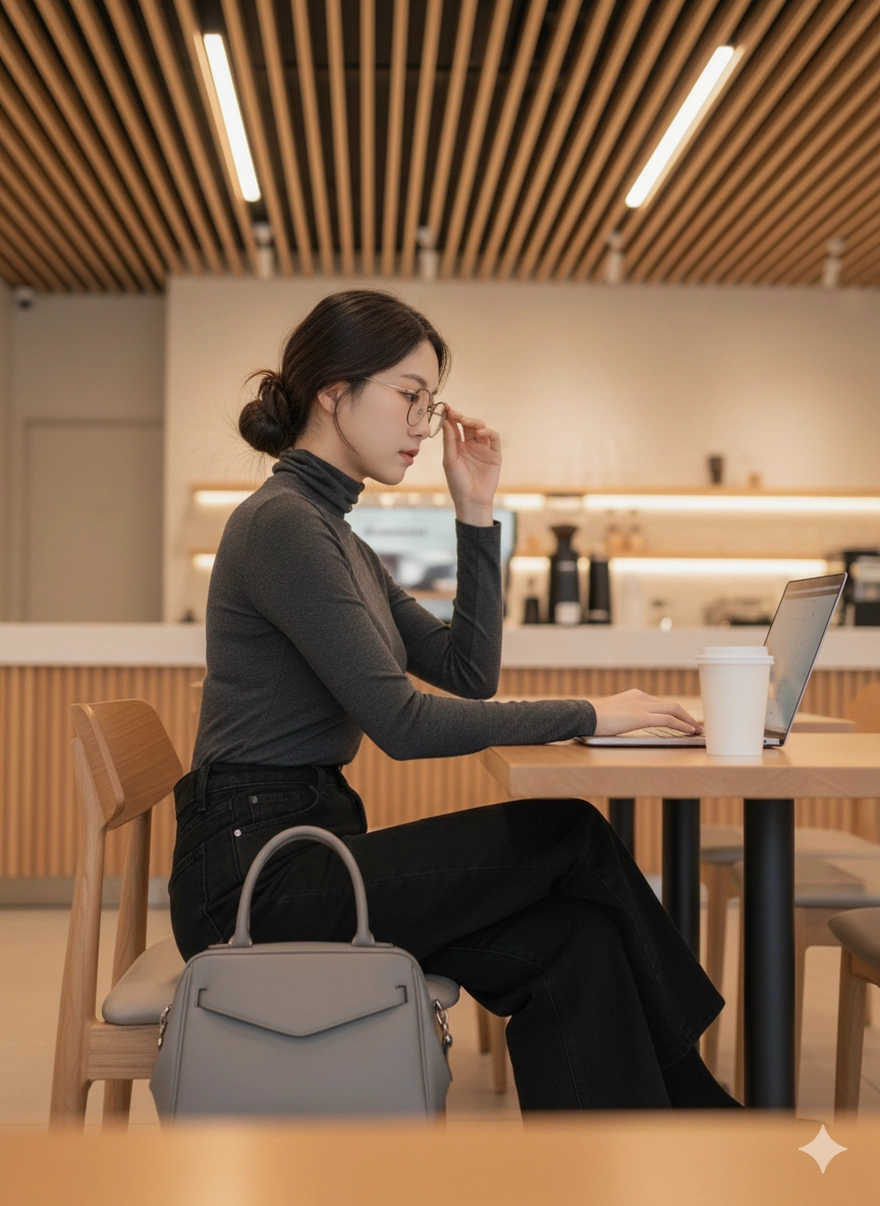
Ảnh 5: Recreate the image from the uploaded photo while keeping the exact same face and all facial features. The girl is sitting in a modern café with warm ambient lighting. She is seated on a wooden chair with legs crossed, working on a MacBook. Her right hand adjusts her glasses, giving a confident and focused expression. Outfit: dark gray fitted turtleneck top, wide-leg black jeans. A silver-gray leather handbag is beside her, and a takeaway coffee cup in the foreground. Background includes striped wooden ceiling panels and a bright minimalistic coffee bar. Clean, modern aesthetic with soft lighting and high clarity.
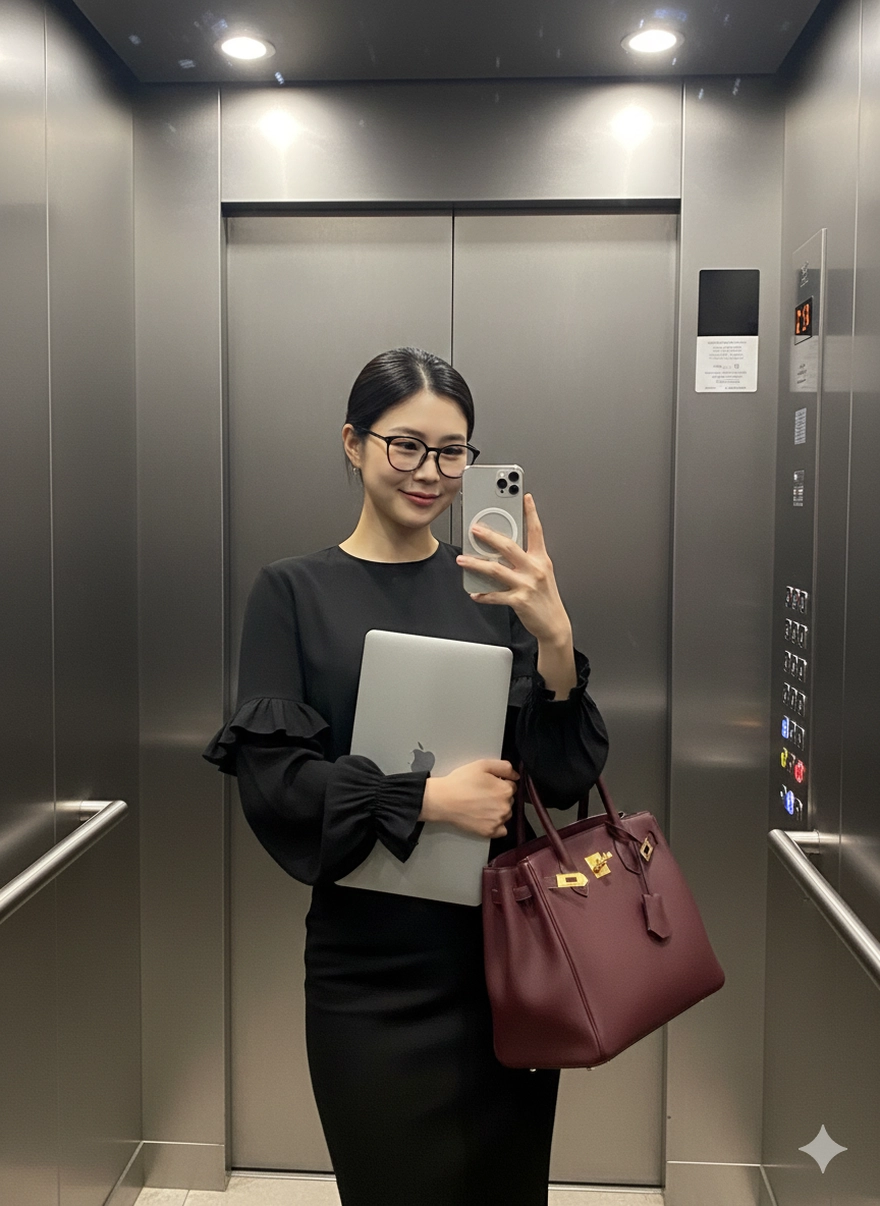
Ảnh 6: Recreate the image from the uploaded photo while keeping the exact same face and all facial features. The woman is taking a selfie inside an elevator, holding a phone in her right hand. Lighting is dim with metallic reflections typical of an elevator. She wears an elegant black outfit with long ruffled sleeves. Hair is sleek and tied back. She has modern thin-frame glasses. In her left arm she holds a laptop and a large burgundy luxury handbag. Maintain the same pose, confident expression, and high-end aesthetic
Ảnh 7: Recreate the image from the uploaded photo, keeping the exact same face and all facial features. The girl is standing inside an elevator taking a mirror selfie. She has long wavy hair with a middle part. She wears a sleeveless black top with gold buttons and wide white pants. In her left hand she holds a small food container and a drink cup. On her shoulder is a stylish white handbag. In her right hand she holds a phone with a pastel floral case. Soft elevator lighting with clean mirror reflections. Maintain the same pose, composition, and modern aesthetic.

Bước 3: Tinh chỉnh và tải về
Sau khi nhận được hình ảnh từ Gemini, bạn nên kiểm tra xem khuôn mặt đã đạt độ chính xác chưa. Nếu cần điều chỉnh, hãy tập trung sửa các yếu tố mô tả ánh sáng, trang phục, hoặc phụ kiện để có được phiên bản tốt nhất. Khi hoàn tất, bạn chỉ cần tải về và sẵn sàng đăng trên mạng xã hội nhận bão like thôi.
Xem thêm
- Cách tắt AI Overviews trên Google để quay lại giao diện tìm kiếm cũ
- Công nghệ bộ nhớ mới vượt tốc độ 1.000 lần DRAM hiện nay
- Google "Bắt Tay" CapCut Tích Hợp Chỉnh Sửa Video Cực Xịn Lên AI Gemini
- Toàn bộ bất ngờ tại The Android Show: Android 17 & Gemini Intelligence đã sẵn sàng!
- Google Maps vừa cập nhật loạt tính năng thông minh: Bạn đã thử chưa?
- Android 17 chính thức ra mắt: Kỷ nguyên của AI hệ thống và siêu đa nhiệm App Bubble
- Đánh giá thực tế Ubuntu 2026 Từ A-Z
- Tạo ảnh nàng thơ váy trắng tinh khôi với Gemini AI
- Tạo ảnh Gemini AI cho những cô nàng yêu màu tím mộng mơ
- Tự soạn CV chỉ qua 1 câu lệnh ChatGPT cực dễ
 Minh Tuấn Mobile



































.jpg)

















.png)






















































Mời bạn cùng thảo luận